API Test Automation The No-code way
Built specifically for manual testers to automate API testing - without writing scripts.



You shouldn't have to start over every time you test
Testers often repeat the same work on every test:

Configure
APIs

Keep changing
test data

Keep running
tests

Keep checking
responses
Next test
cycle
Huge thanks to our feedback providers
These IT professionals and anonymous contributors took the time to explore BusStop and share ideas for making it better.

Thank you for being part of BusStop's journey.
How BusStop works ?
Set it up once. Reuse it every test cycle.
01 Configure API
Configure API
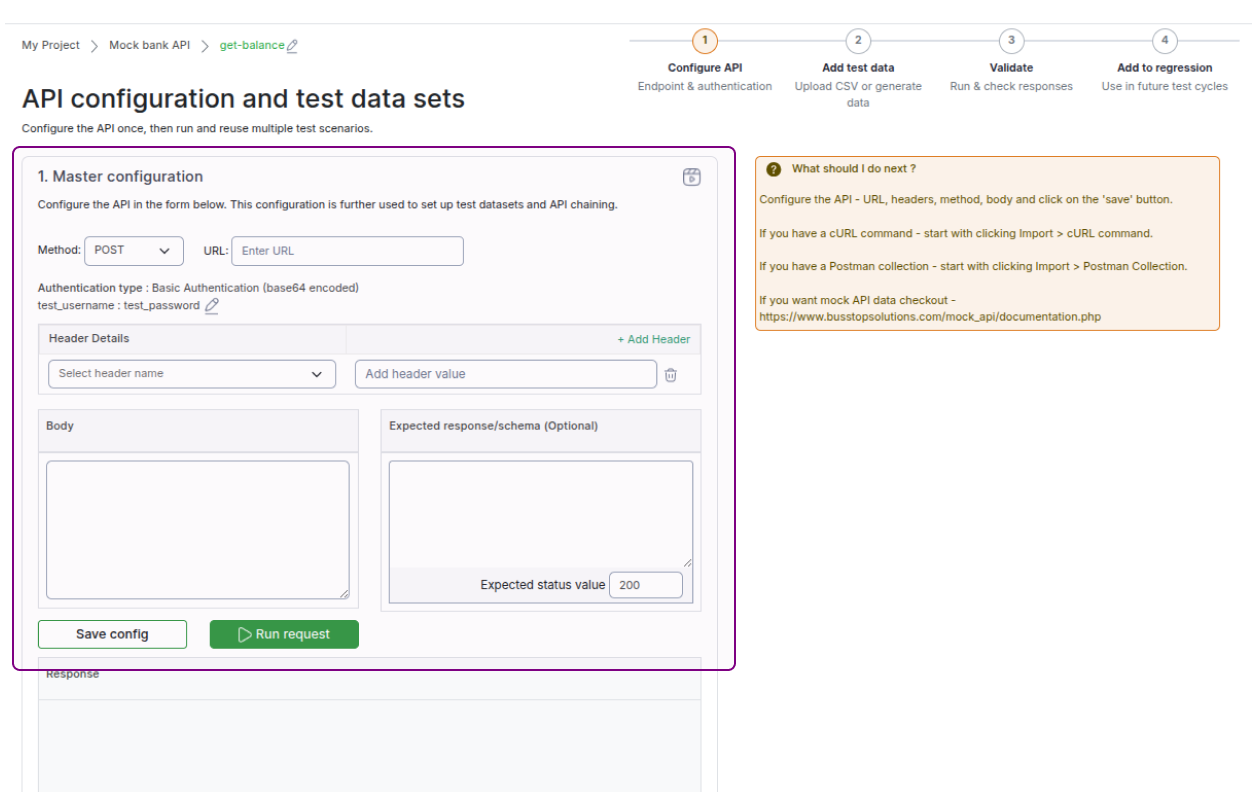
Add the endpoint, headers and authentication
02 Add test cases
Add test cases
Upload test data (valid, invalid, boundary) or generate it with AI.
03 Run and validate
Run and validate
Executes the tests in one click and validates the responses.
04 Review failures
Review failures
Focus your attention on the scenarios that failed.
You're Already Ready
The setup work is already done.
Regression Suite
ReadySee it in Action
See how you can configure an API once and test it again.
Made for the way testers work
We, the testing community, already know how to test. We shouldn't have to become programmers to automate it. BusStop helps to automate the testing we already know how to do — without writing scripts.
Automate my first APIBusStop Or Postman
Both work with APIs. They are built for different goals.

Choose BusStop when
Your goal is API testing
Designed for manual testers and QA teams who want to automate API testing without writing scripts.

Choose Postman when
Your goal is the broader API lifecycle
Postman provides extensive API development, collaboration and testing capabilities.
If your job is testing APIs, BusStop is built for you.
Learn BusStop in Minutes
Short tutorials take you through the complete workflow

Go further

Frequently asked questions
What is BusStop?
BusStop is a no-code API test automation tool that enables manual testers to create, run and maintain automated tests themselves. Users can upload test data through CSV files or generate it with AI, validate API responses and reuse tests across releases.
Who is BusStop for?
BusStop is designed for manual testers and QA teams who want to automate API testing without writing scripts. It also helps test leads and managers organise repeatable API tests into regression suites.
What problem does BusStop solve?
Testing the same API with different inputs can involve repeatedly changing data, running requests and checking responses. BusStop lets testers prepare these scenarios once, execute them together and reuse them in future test cycles.
Do I need coding knowledge to use BusStop?
No. You can configure APIs, add test data, set response checks and maintain tests through the user interface. You still need to understand the API’s requirements, inputs and expected results.
How does BusStop API testing work?
BusStop follows four steps: Configure the API → Set the test data → Execute and review the results → Add to a regression suite. You can update the configurations, data and checks through the UI whenever requirements change.
How do I create my first API test in BusStop?
Add a request and configure its method, URL, headers, body and authentication as required. Then upload test data through a CSV file or generate it with AI, configure the response checks and run the test to review the results.
Can I upload CSV test data or generate it with AI?
Yes. BusStop supports both CSV uploads and AI-generated test data. You can prepare valid, invalid, empty and boundary scenarios, then review and modify the data before running your tests.
How does BusStop validate API responses?
BusStop provides built-in checks for API response status codes and response schemas. You can configure the schema checks and expected response assertions to match your API’s requirements, then review the results for each scenario.
Can I configure test environments and authentication?
Yes. BusStop provides project-level settings for environments and authentication. These help you manage API tests across environments such as testing, staging and production.
How do I create and run a regression suite in BusStop?
Add your configured API tests to a regression suite, then run the suite when you need to verify existing functionality. You can reuse the tests across releases and update their data and checks as requirements change.
Can I schedule API tests in BusStop?
Yes. BusStop’s scheduler lets you configure tests to run at scheduled times. You can review the execution results to check whether the API responses meet your configured expectations.
How do I maintain automated tests in BusStop?
You can modify API configurations, test data and response checks through the UI. This allows you to keep your tests aligned with application changes without editing automation scripts.
When should I choose BusStop over Postman?
Consider BusStop when your main goal is to automate data-driven API tests and maintain reusable regression suites without scripting. Postman supports a broader API workflow, including development, collaboration and testing. The choice depends on your team’s needs.
Is BusStop free?
BusStop offers free access with 50 API calls per day.
How can I try BusStop?
Visit busstopsolutions.com/sign_up.php and sign up. You can start with a preconfigured sample API or configure your own API, add test data and run your first test.