How BusStop works?
BusStop is built to simplify repetitive API testing workflows. Instead of manually changing inputs, re-running requests, and checking responses one by one, BusStop helps you configure reusable test data, add built-in response validations, and execute test cases in bulk. The goal is to make API regression testing faster, more consistent, and easier to repeat during every release cycle.
Run and Validate the API Tests
Once the test data is uploaded or generated, the next step is execution.
BusStop allows testers to execute an entire dataset in a single click and automatically validate the API responses against the expected results.
This helps teams run regression scenarios faster without manually sending requests one by one.
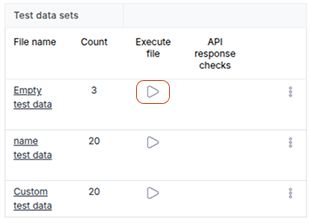
Execute the Test Data Set
Each test data set in BusStop has a Play button beside it.
To run the test cases:
- Locate the required test data set
- Click on the Play button
- BusStop starts executing all test cases inside that dataset automatically
Example:
If the dataset contains:
- 10 positive scenarios
- 15 negative scenarios
- 5 validation scenarios
BusStop executes all 30 test cases sequentially.
This removes the need to repeatedly:
- Copy request bodies
- Change inputs manually
- Re-run APIs one by one
- Track execution status separately
Automatic API Response Validation
During execution, BusStop automatically compares the API response with the configured expected results.
The system validates:
- Status codes (by default its checks for status code 200 – this is configurable)
- Response structure
- JSON attributes
- Expected values
- Validation messages
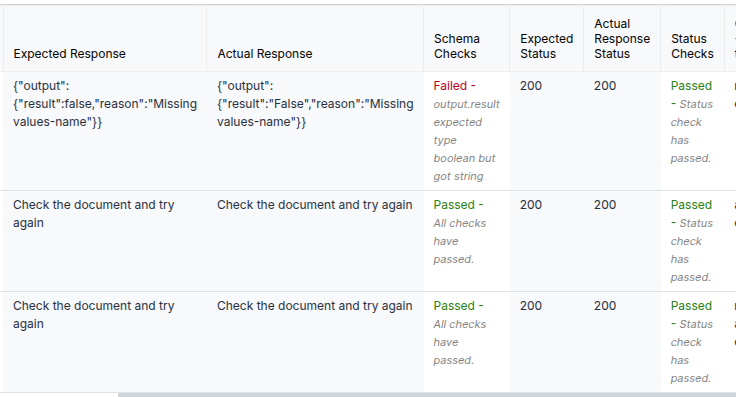
This helps testers quickly identify:
- Failed validations
- Missing attributes
- Incorrect values
- Schema mismatches
- Unexpected API behavior
Instead of manually checking every response, the system highlights the mismatches automatically.
View the Execution Results
After execution, BusStop provides a detailed result summary for each test case.
Testers can quickly see:
- Passed test cases
- Failed test cases
- Validation comments
- Actual vs expected response differences
This makes regression testing easier to review and faster to debug.
Update Expected Results Later (Optional)
If you skipped the expected response configuration during the test data setup step, you can still update it later.
To update expected results go to setting-> Manage data set:
From here, you can:
- Edit test data
- Add expected responses
- Update validation values
- Improve verification rules over time
This flexibility is useful when:
- APIs are still under development
- Response structures are changing frequently
- Teams want to first focus on execution setup
Why This Matters
In many teams, API regression testing becomes repetitive because testers manually:
- Send the same requests repeatedly
- Compare responses manually
- Track failures in separate documents
- Revalidate small changes again and again
BusStop simplifies this workflow by combining:
- Bulk execution
- Reusable datasets
- Automated validation
- Faster regression cycles
So testers spend less time repeating steps and more time analyzing actual issues.
 Configure test data for an API endpoint
 Run and re-run your test cases in bulk
Like what you read?
Be updated with feature updates, promotional offers, latest content and more from BusStop - API Automation testing tool.